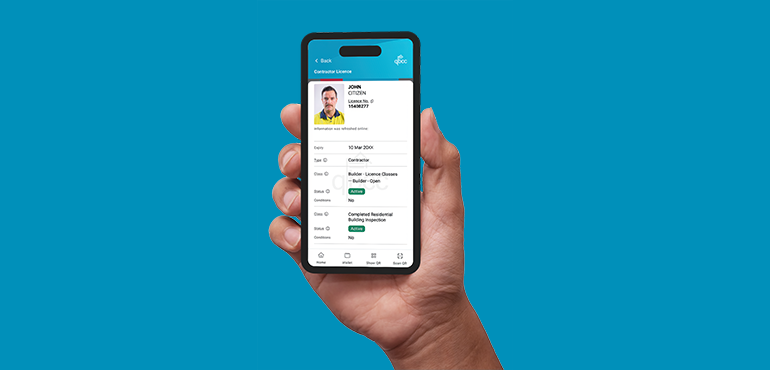
Now, you can securely store and display your QBCC licence on your mobile device using the Queensland Digital Licence app. No more digging through the glovebox or worrying about lost or damaged cards – your licence is always with you, up to date, and ready to go.
This is part of our commitment to modernising service delivery. By going digital, we’re making it easier for you to do business with us, saving you time and streamlining your experience.
What is a digital licence?
A digital licence is the same as a physical QBCC licence, just on a mobile device. It carries the same legal status as the physical licence card, which licensees will still receive. The digital version is simply more convenient, secure, and easy to access on a mobile.
Important note: The QBCC digital licence availability
The QBCC digital licence is currently available only to individual licence holders through the Queensland Digital Licence app. At this stage, company licences are not supported.
🎦 Watch our video for a quick snapshot of the features.
What's in it for you?
Going digital is optional, but once you try it, you might not look back.
Here’s what you’ll get:
- Your licence stored safely on your phone so you can leave your physical card at home or in the office.
- Renewals and changes updated in real time, once processed, no more waiting for the post.
- Store multiple licences in one place. If you hold more than one QBCC licence, they’re all stored together.
- Know your status. Whether it’s active, up for renewal or expired; you’ll know right away.
- Peace of mind. Built-in security features mean your digital QBCC licence is official and protected.
- Already using a Queensland digital driver licence, photo ID card or marine licence? Your photo will automatically carry over; no need to verify a new one.
- Need to check someone else’s licence? Do it on the spot – hiring subbies has never been easier.
Who is it for?
These digital licences are available to individual QBCC licensees who hold one of the following licence types:
- Site Supervisor
- Pool Safety Inspector
- Plumbing and Drainage
- Mechanical Services Occupational
- Fire Occupational
- Contractor
- Nominee Supervisor
- Certifier.
To be eligible to use the Queensland Digital Licence app, you need to have a Queensland Government-issued product, such as a:
- Driver licence
- Marine licence
- Photo identification card/Adult Proof of age card.
More products are being added, to learn more visit: About the digital licence app
The QBCC digital licences are not available to company licence holders.
View all valid QBCC licence cards here.
New applicants
The QBCC’s redesigned QBCC Act licence application forms are now available via our service centres and to download from our website. You will need to provide a passport-sized photo to support your application – view photo-ID requirements here.
What does it mean for home owners?
While physical licences are still issued, the QBCC’s digital licences offer a fast and secure way to verify a contractor’s credentials on the spot. It gives peace of mind that you’re working with a qualified professional and helps protect your investment from unlicenced work.
Watch this video to learn why it's important to choose a licensed contractor.
Note:
If you work in environments where mobile devices are restricted (e.g. surgical, sterile, or high-security areas etc.), you’ll still need to carry and present your physical licence card.
How do you get started?
Your first step, if you haven’t already, is to download the Queensland Digital Licence app on your mobile device via:
画像
| 画像

| 画像

|
- To begin using the Queensland Digital Licence app, you must first add a Queensland Government-issued product, such as your driver licence, marine licence, or adult proof of age card.
- First time users of the app will need to go through a series of onboarding steps before using the app.
- Once you’ve onboarded, open the wallet tab in the app, and add your QBCC licence by clicking the + button and following the prompts on the screen.
- The photo on your driver licence will automatically transition to your QBCC digital licence.
- When applying for a licence, a current photo is still required to complete the process.
- The photo on your physical QBCC licence may be different to the one on your QBCC digital licence because the digital version is from TMR’s record and the physical licence photo is from QBCC’s record.
- The dates on the two types of licences i.e. physical card and digital licence might be different by one day. If this is the case, please note: the expiry date on your physical card is the day it becomes invalid (the day before your renewal). The date shown on your digital licence reflects your next renewal date.
- We are working on aligning the dates, on the physical card to the digital card, in the future.
No internet connection?
- The Queensland Digital Licence app securely stores your encrypted information on your device. When internet access is available, it automatically checks for updates to ensure your details are current. If you're offline, the app will use the most recent version stored locally, allowing you to continue verifying your identity without interruption.
Read our FAQs here
Follow this link to provide feedback on digital licences
Contact and support
If you have any questions about QBCC digital licences, call our Contact Centre on 139 333, between 8.30am and 5pm. Prefer in-person help? Our customer service centre staff are here to assist. Visit our website to find a customer service centre near you.